Thanks for your answer.
I use Saturne 8.0.4 now.
I have never made any CFD code so I don’t know details. My idea was to take a user example and modify the number of iterations. The code is as follows:
cs_multigrid_t *mg;
mg=cs_multigrid_define(-1,"TempC",CS_MULTIGRID_V_CYCLE);
cs_multigrid_set_coarsening_options(mg,
                                    3,    /* aggregation_limit (default 3) */
                                    0,    /* coarsening_type (default 0) */
                                    10,   /* n_max_levels (default 25) */
                                    30,   /* min_g_cells (default 30) */
                                    0.95, /* P0P1 relaxation (default 0.95) */
                                    0);  /* postprocessing (default 0) */

cs_multigrid_set_solver_options
  (mg,
   CS_SLES_PCG, /* descent smoother type (default: CS_SLES_PCG) */
   CS_SLES_PCG, /* ascent smoother type (default: CS_SLES_PCG) */
   CS_SLES_PCG,    /* coarse solver type (default: CS_SLES_PCG) */
   100,             /* n max cycles (default 100) */
   2,              /* n max iter for descent (default 2) */
   10,              /* n max iter for asscent (default 10) */
   100,           /* n max iter coarse solver (default 10000) */
   0,              /* polynomial precond. degree descent (default 0) */
   0,              /* polynomial precond. degree ascent (default 0) */
   0,              /* polynomial precond. degree coarse (default 0) */
   -1.0,           /* precision multiplier descent (< 0 forces max iters) */
   -1.0,           /* precision multiplier ascent (< 0 forces max iters) */
   1);           /* requested precision multiplier coarse (default 1) */
As I can see, multigrid solves first on coarse mesh, then interpolates and solves on finer meshes… I selected default solvers (all PCG). Maximum number of iterations was reduced from 10000 to 100. Anyway, it’s also not the best way because it will replace Saturne’s internal optimal solver selection (I use Auto solver settings now).
Regarding variables/GUI. When I was working on my relatively simple programs, I used to use the following rule. I had a big structure/class for entire program with all the data. Subroutines was fed with this structure (ptr) and particular substructures to work on (ptr). So everything was accessible from everywhere. Then, in GUI, all the variables from this big structure was exposed, it was mandatory. So there was zero possibility (except bugs) of any global variable not editable/seen from GUI. For more complex programs I used a configuration. It’s the same structure holding all numerical and physicsl settings like reaction list and rate parameters, numbers of iterationg, tolerances etc. This structure also passed to every function as an argument (ptr) so no problem to access anywhere. Cfg files was text with specific format like:
VariableName {Path} > Value,
although you can use XML with the same result. Path is an identifier within structure (for example: mdl.rcn.rcn(1).actEng). Something like this is definitely useful for Saturne, but it requires lots of work to rewrite. Also, my interface was more complex than Saturne GUI even for non-CFD (classic engineering) software just for one “big” element (universal heat exchanger, chemical reactor / furnace zone), so applied to CFD it will require lots of windows. To make GUI more usable, I used “elevation”: many variables was copied from lower to upper levels in document-view interface making them accessible for the user without digging too deep in treeview (names has lite-green background to distinguish elevated items). Benefit is absolute control of global structures that eliminates the problem of access of settings/results anywhere.
Intermadiate approach that you can use is a global configuration class fully stored for the case in XML (or my name/path/value format) and partially accessible form GUI. The most quick workaround is to add one GUI parameter in solver settings table to replace hard-coded max of 10000 iterations.
The other major thing related to solver settings and GUI. Using Saturne many times, I figured out that two things must be used:
- Individual min/max limits for all fields.
- Individual relaxation for all fields.
It’s much more important than starting with UPWIND and switching to SOLU then. It’s of primary importance. Would you, please, add these parameters to GUI? I have my user functions, but many users will benefit form possibility to just set it in GUI. Example default relaxations are 0.1…0.5 (0.3).
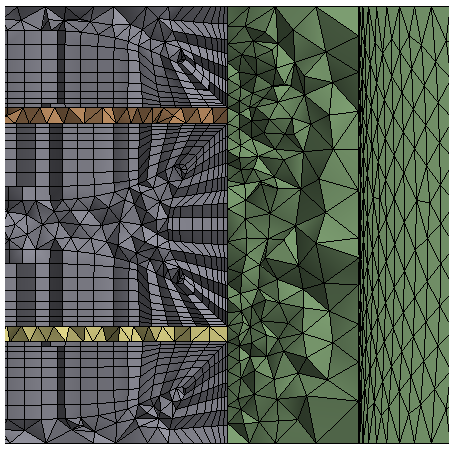
I also want to briefly mention another issue to not to start the full topic (sorry, don’t have time now). When you couple Solid/Fluid on inflated boundary (prism layer in fluid zone), program gives lots of join errors and diverges in omega solver (my part of mistake: I forgot to relax omega, but it’s not a root-cause). Joiner cannot couple first layer of prisms with relatively thick tetras in solid. Settings does not help. You can find this on any finned tube case with internal coupling and non-conformal mesh at the interface. The remedy is to use conformal mesh (no need to join), but what if such mesh cannot be build due to meshes issues? Please check if you will have some spare time (for example, take 20mm O. D. pipe, 1 mm fins with 3 mm fin step and non-conformal mesh with inflation in fluid zone).